Posts

Are You Too Customer-Heavy? Visualizing Sales Dependency in Tableau

Image
Want a clear view of how much your biggest customers drive monthly revenue? This bar-in-bar Tableau visualization compares total monthly sales against sales from your top N customers—offering instant insights into customer concentration. It highlights trends like seasonal spikes, over-reliance on top buyers, or shifts in purchasing behavior, helping teams spot risks, guide retention strategies, and make smarter, data-backed decisions at a glance. Interactive Version

Conference Sessions, Visualized

Image
This Tableau dashboard uses generative AI and regex to transform messy HTML into a clean, interactive Gantt chart. Sessions are split by date and AM/PM, sorted by time, level, and duration, with color-coded bars for easy scanning. Highlights and tooltips enhance exploration of session details like Title, Description, and Skill Level.  Why it helps users: - Quickly spot relevant sessions by time and skill level - Compare durations to plan attendance - Visually navigate busy event schedules with clarity  Interactive Link

BookShop Analytics Dashboard

Image
This interactive dashboard is designed to help a fictional bookstore monitor key performance metrics including Average Transaction Value, Book Count, Total Sales, Total Orders, and Number of Publishers. Users can dynamically slice and filter these metrics by Genre, Format, Author Name, and Publishing House, offering granular insights into business performance. The dashboard also supports time-based analysis, enabling the tracking of sales trends across various periods (daily, monthly, quarterly). A key feature is a scatter plot visualization that correlates average book ratings with total sales, helping the marketing team identify high-performing titles and untapped opportunities for promotions, cross-selling, and inventory decisions. This tool empowers data-driven decision-making to enhance sales strategies and improve overall store performance. Interactive Link Tool Used - Tableau

2025’s Best Countries to Live and Work Based on the Henley Opportunity Index

Image
 The Henley Opportunity Index 2025 highlights the top countries offering the best opportunities for living and working. Leading the list in Total Score is Switzerland, renowned for its high earning potential, career growth, and economic mobility. Singapore follows closely, celebrated for its open economy and progressive education system. The United States ranks third, offering top-tier employment opportunities and high earning potential. Other notable countries include Australia, Canada, and the United Kingdom, each providing unique advantages in terms of career advancement, education, and livability. This index serves as a valuable guide for individuals and families seeking better opportunities worldwide. Interactive Version

The Growing Gap

Image
  India's wealth gap is growing. The rich are getting richer, while the poor are getting poorer. This inequality can lead to social unrest and hinder economic growth. Interactive Version
Exponential Rise of Large Language Models

Image
  LLMS are rapidly evolving. Major tech firms are locked in a fierce competition to develop increasingly sophisticated models, pushing the boundaries of AI capabilities. Interactive Version

French having second thoughts about Olympics

Image
  Interactive Version

Batman Movies

Image
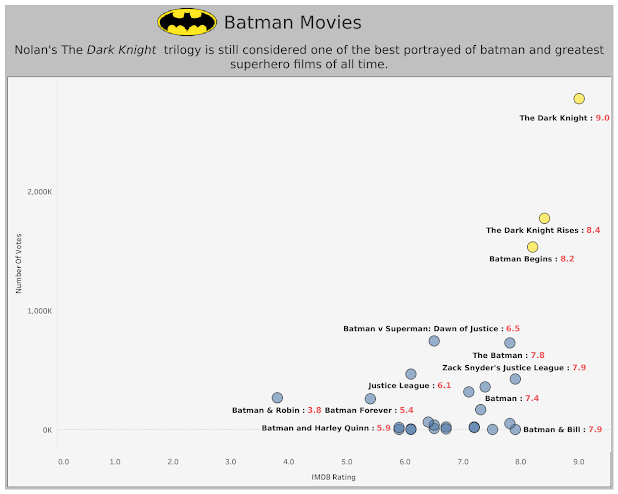
 Created viz for Tableau's #DataPlusMovies challenge. This viz shows popularity of Batman movies by analyzing IMDB ratings and Number of votes for that movie. Nolan's Dark Knight Trilogy still ranks ahead of other batman movies. Interactive version

A Toast to Wine Tasting Event

Image
Welcome to wine tasting event dashboard! This interactive tool allows you to track the performance of tasters as they identify the grape and country of origin for each wine. With a scoring system that awards points for correct and partially correct answers, you can see how each taster fares in their knowledge of red and white wines. The dashboard is easy to use, with the ability to sort by Overall Score, Red Score, or White Score, and includes images in the table headings related to the Score Type. Join us as we explore the world of wine through the eyes of wine tasters! 🍷 Interactive version Tool Used:- Tableau

The power of your passport

Image
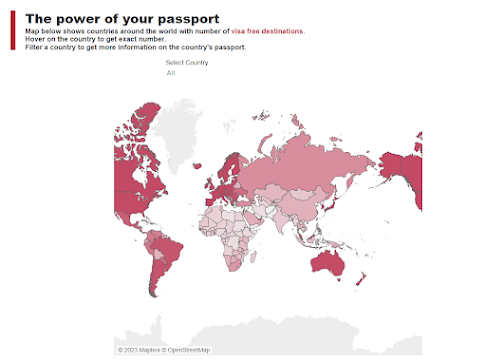
 For makeover Monday I created this visualization to showcase how passports for different countries are ranked. Developed countries with better GDP enjoy more visa free destinations than other countries. One might say there is a positive correlation between countries’ GDP and number of visa free destinations. Singapore ranks #1 with Japan coming at #2, while Afghanistan and Syria rank at bottom. Interactive Version Tool Used: Tableau

Which of my products returned max and min sales?

Image
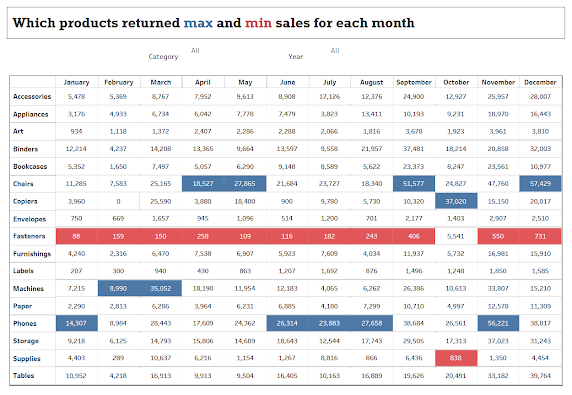
 This crosstab visualization provides details on most in demand product and least sold product for each month. User can use this information to detect a pattern and better plan their inventory. Use category and year filter to further drill down on chart. Interactive Version Tool Used:- Tableau

Cereal Production Around the World – Africa’s Hunger Crisis

Image
 This dashboard shows uneven distribution of cereal production across the globe. Despite of green revolution launched half a century ago to maximize cereal production, most of the African states are still struggling to keep a balance between their population and cereal production which ultimately results in malnutrition of the population. Follow the link below the image for interactive viz.   Interactive Version Tool Used: Tableau

Melbourne Pedestrian Counting System

Image
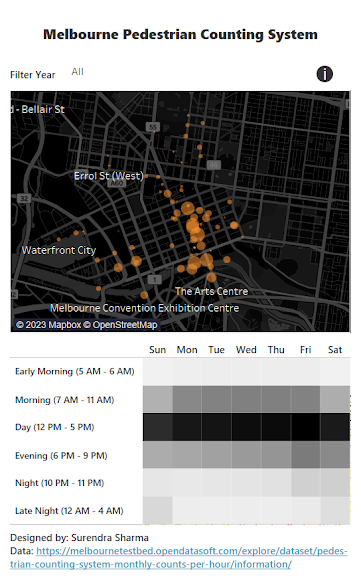
Created this mobile friendly dashboard to track Pedestrian Patterns for Melbourne city. The city has sensors placed at major spots to track pedestrian foot traffic. Original tracking system can be found at http://www.pedestrian.melbourne.vic.gov.au/ . This dashboard is a makeover for the original system to better track pedestrian patterns. Using this information city administration can get information on different areas and rush at period of day. This information can be used for better city planning such as diverting traffic or deciding working hours for maintenance work. Interactive Version Tool Used: Tableau

Heads or Tails

Image
Build a viz showing what percentage of matches are won by a team after winning the toss. It basically tells if winning a toss have any crucial impact on the match result. What I can see from viz is that it does have some affect on the outcome but nothing significant. In the end, how team plays on the field is all that matters. Interactive Link Tool Used:- Tableau

Superstore Executive Dashboard

Image
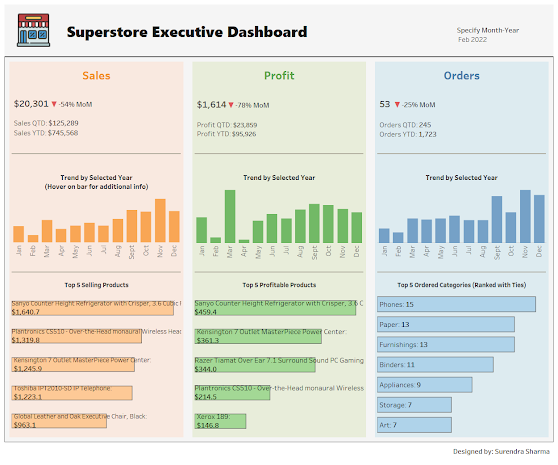
Here's my take on executive type dashboard built on superstore data. The major learning from this dashboard was using layout containers inside tableau to neatly organize dashboard items. Layout containers let you group related items together so you can quickly position them. Once items are inside the containers, you can change the size and placement of items inside a container and other items automatically adjust. There are two types of containers - vertical and horizontal. As name suggests, horizontal containers places items left/right and vertical containers places items above/below. It’s always a good idea to use containers for your production dashboards as this will greatly help you organize and standardize the size and layout of your dashboard’s worksheets.   Interactive Version Tool Used:- Tableau

McHealthy

Image
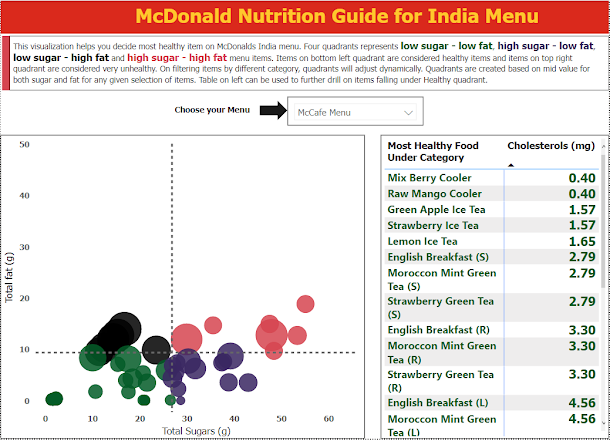
  Ever wondered what is the most healthy dish on McDonalds India menu. This visualization helps you quickly choose a healthy item based on factors like total sugar, total fat and cholesterol. Read text on visualization to know more. Click on image to enlarge

Centralized Project Tracker

Image
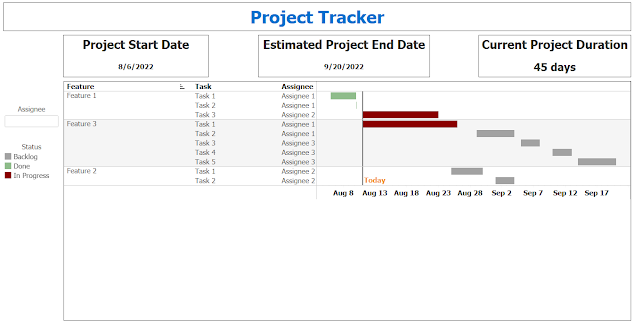
While working on a recent project I have to come up with a way to schedule and maintain tasks and timelines. Very first chart that came to mind was Gantt Chart.  A Gantt chart is a type of bar chart that illustrates a project schedule, named after its popularizer, Henry Gantt, who designed such a chart around the years 1910–1915. Modern Gantt charts also show the dependency relationships between activities and the current schedule status. As we all do regarding any project management activity, I tried to implement it in excel first. But there's no default option to create Gantt chart. With some calculations and lots of conditional formatting I was able to create one but refrained from using it because of two reasons:-  It's not a centralized solution where anyone from team can lookup status of the project. Every time there's some change in schedule you have to update the tracker and then share it with everyone, who might in turn share it with someone else without keeping ev...

Who turned the lights off?

Image
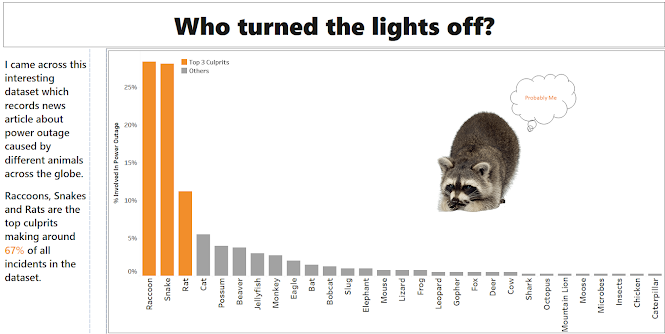
  I was browsing through Alteryx Community and found an interesting dataset about power outage caused by animals. Dataset contains around 400 rows recording different news articles around the globe. It also contains which animal caused the outage and in what country. For some records, specific animal name was not specified and instead it says "Animal". This was a challenge  as to get actual count on specific animal I have to extract animal name from news article. I used some text mining feature in Alteryx to achieve this. End result is a graph depicting  power outage by different animals around the world. Note:- I would not make any inference from this data as it was probably not a good sample of all the incidents around the world and was  heavily   biased   on  incidents concerning  to United States . But still a fun analysis. Click on picture to enlarge:- Tool Used:- Tableau & Alteryx

SQL Bars?

Image
While browsing through some SQL puzzles, I came across one where it asked to create a bar chart inside SQL server. Initial thought - It will require some sort of text manipulation. But before that I need to structure the data in proper format. Input Table:- The problem is divided into 3 parts:- Get regions and their total quantities. Because total quantities would be huge, it will not be possible to plot them as bars. Therefore, convert those quantities into percentage of total value. Create bars for percentage of total value against each region. SQL script with cte as ( select Region, sum(Order_Quantity) as Quantity, sum(SUM(Order_Quantity)) over () as [Total Quantity], round( ( CAST( sum(Order_Quantity) as float ) / cast (sum(sum(Order_Quantity)) over () as float ) ) * 100 ,0) as [% Total] from superstore group by Region ) select Region, [% Total], REPLICATE('|',[% Total]) as [Bars] from cte Output Table:- It was a fun little exercise to think outside the box and how you ca...

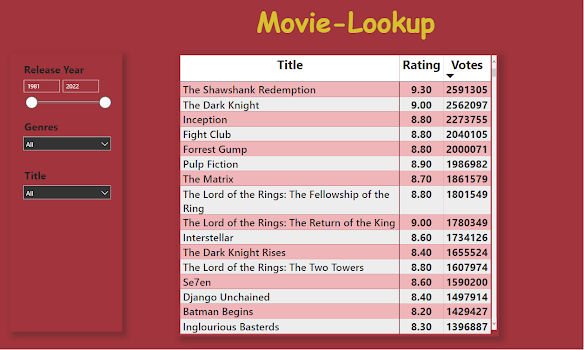
Movie-Lookup

Image
Ever wonder which movie should I watch this weekend?  You login to your favorite streaming service just to find yourself struck in vicious loop of  checking it's rating on IMDB and then searching for some more before deciding on that one movie which you might find interesting. I thought wouldn't it be great to have a dashboard with movies rated and you can apply some criteria to find what movie you are looking for. I searched for IMDB data and found it on kaggle website. This data is used to create and train recommendation systems, but for me a simple dashboard was enough to find movies I might enjoy on my weekend.